Most small company websites are not lost on design taste. They are lost on decisions made in the wrong order: a logo before a goal, a theme before a page plan, a launch before a test on a phone. This guide gives you the order, step by step, whether you are building the site yourself or briefing a freelancer.
Quick answer: how to design a small company website
Start with one business goal (calls, quotes, bookings or orders), then buy a domain and hosting, pick one platform you can update yourself, and map five to eight pages around that goal before you touch a single colour. Write the copy first, add real photos of your work and team, then run a launch checklist covering mobile display, speed, forms, analytics and legal pages. Expect a realistic budget of a few hundred dollars for a careful DIY build, or a few thousand for a freelancer or small agency.
Step 1: Define the one job your website must do
A small company site is not a brochure, it is a conversion tool. Before anything else, write one sentence: “This website exists to get ___ .” Examples: quote requests for a roofing company, table bookings for a bistro, demo calls for a B2B software firm, online orders for a shop. The piece Top Small Business Website Design Companies makes a good next read.
Then define the supporting details:
- Primary action: phone call, form, booking widget, add to cart.
- Who you are talking to: local homeowners, HR managers, procurement teams. Write for one of them, not everyone.
- What you will measure: form submissions and calls per month, not page views.
- Deadline and budget ceiling: a fixed number keeps scope under control.
If you hire a freelancer, this single page is your brief. It is also the fastest way to avoid paying for features you will never use.
Decide early: DIY, freelancer or agency
- DIY works if you have 20 to 40 hours, five to eight simple pages and no custom functionality.
- Freelancer works if you want a polished result, custom design and someone to handle technical setup, while you keep the content work.
- Agency makes sense when you need strategy, copywriting, SEO, integrations (CRM, booking, payments) and ongoing support bundled together.

Step 2: Secure your domain, hosting and business email
These three are separate purchases and should stay in your name, not your designer’s. This is the single most common ownership mistake in small business web projects.
Domain name
- Short, easy to spell out loud, no hyphens or numbers if you can avoid them.
- Prefer
.comfor international reach, or your country extension (.co.uk,.ca,.fr,.de) if you serve one market. - A
.comregistration usually costs roughly 10 to 25 USD per year at mainstream registrars; check the renewal price, not just the first year promo. - Turn on auto-renew and registrar lock on day one.
Hosting
If you use a hosted builder (Wix, Squarespace, Shopify), hosting is included in the subscription. If you use self-hosted WordPress, you buy hosting separately. Shared hosting is the cheapest entry point, managed WordPress hosting costs more but handles updates, backups and caching for you.
Non-negotiable features, whatever you choose: free SSL certificate (most hosts provide it via Let’s Encrypt), daily backups, and a staging or test environment if you plan to keep editing the site.
Business email
Use [email protected], never a free webmail address on quotes and invoices. Google Workspace and Microsoft 365 both publish per-user monthly pricing; many hosts also include a basic mailbox.
Step 3: Choose a platform you can actually maintain
The best platform is the one you will still be able to update in eighteen months without calling anyone. Here is an honest comparison of the mainstream options for small companies.
| Platform | Best for | Strengths | Watch out for |
|---|---|---|---|
| WordPress (self-hosted) | Service companies, content-heavy sites, anyone who wants full ownership | Open source, huge plugin ecosystem, portable between hosts, strong SEO control | You own maintenance: updates, backups, security |
| Squarespace | Design-led small businesses, studios, consultants | Polished templates, everything in one subscription, very little technical work | Less flexibility, harder to migrate away later |
| Wix | First-time builders who want drag and drop | Fast to launch, built-in booking and forms, large app market | Templates cannot be swapped after publishing; content is not portable |
| Shopify | Anyone selling physical products | Best-in-class checkout, inventory, shipping and payments | Overkill if you sell nothing; transaction fees apply if you avoid Shopify Payments |
| Webflow | Brands that want a custom design without custom code | Pixel-level control, clean output, good CMS | Steeper learning curve; usually needs a designer |
Pricing for all of these changes regularly. Always check the official pricing page of the platform before you commit.
Step 4: Map your page structure before you design anything
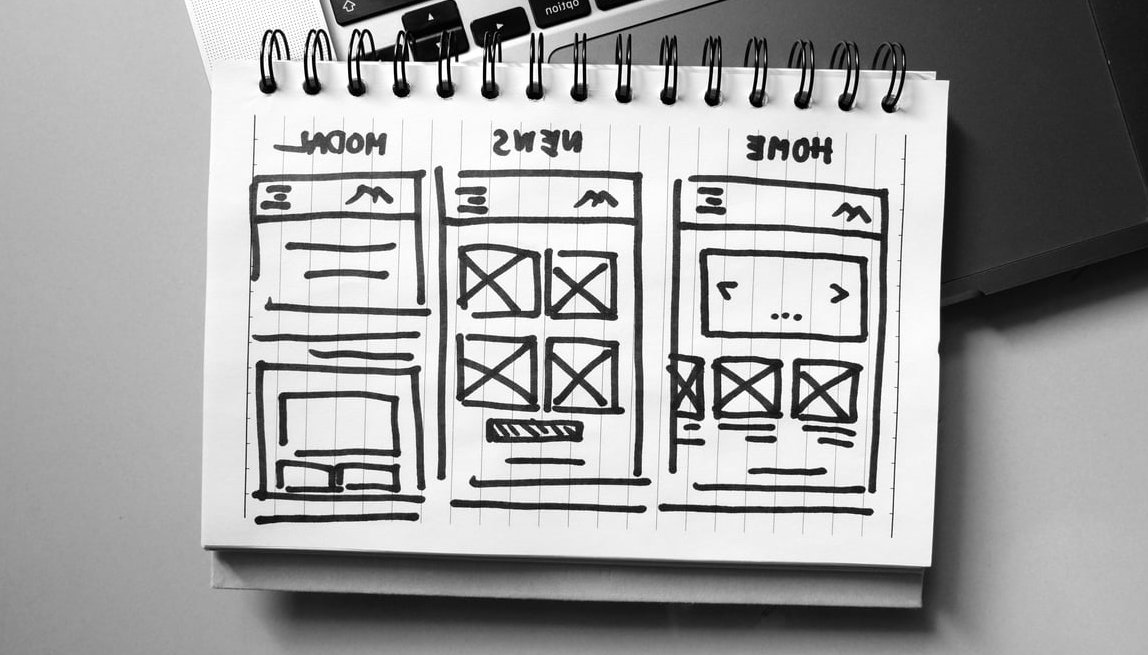
Sketch the sitemap on paper. A small company rarely needs more than this:
- Home: who you are, what you do, for whom, where, and one clear action above the fold.
- Services (one page per main service if you care about local SEO, not one page listing everything).
- About: real people, real address, real story. This page is read more often than owners expect.
- Proof: portfolio, case studies, testimonials, certifications, before and after photos.
- Pricing or “How we work”: even a starting-from range reduces unqualified enquiries.
- Contact: form, phone, email, address, map, opening hours.
- Legal: privacy policy, cookie notice, terms, and any mandatory business identification for your country.
Navigation rules that keep working
- Five to seven items in the main menu, maximum.
- The same primary button in the header on every page.
- Phone number clickable on mobile (
tel:link). - Every page reachable in two clicks from the homepage.
Step 5: Write the copy before you choose a template
Designers call it content-first design, and it is why some projects stall for months: the template is chosen, then nobody writes the text. Flip the order.
A simple formula for each page
- Headline: the outcome the customer wants, in their words. “Emergency plumbing in Leeds, on site within 2 hours” beats “Welcome to our website”.
- Subheadline: who it is for and what makes you different.
- Three proof points: years in business, guarantee, accreditation, response time.
- Objection handling: price, timing, contracts, what happens next.
- Call to action, repeated at the top and bottom.
Basic on-page SEO while you write
- One unique title tag and meta description per page.
- One
H1per page containing the service and, for local businesses, the city. - Descriptive URLs:
/services/roof-repair, not/page-id=42. - Internal links from the homepage to each service page.
- Add LocalBusiness structured data and claim your Google Business Profile.

Step 6: Visuals, brand and accessibility
Visual consistency matters more than visual originality for a small company. Lock down a small system and apply it everywhere.
- Two fonts maximum: one for headings, one for body text. Body text around 16 to 18 pixels on desktop.
- Three colours: primary, neutral background, and one accent reserved for buttons only.
- Real photography: your team, your premises, your finished work. Generic stock photos of people shaking hands actively reduce trust for local businesses.
- Compress images and serve modern formats (WebP or AVIF). Oversized images are the number one cause of slow small business sites.
- Accessibility: follow WCAG 2.2 basics. The AA standard asks for a contrast ratio of at least 4.5:1 for normal text, alt text on meaningful images, keyboard-navigable menus and visible focus states.
Step 7: The launch checklist
Do not publish until every box below is ticked. Print it and hand it to your freelancer as acceptance criteria. A comparable breakdown sits on thedesignocracy.us.
Technical
- HTTPS active on every page, with HTTP redirecting to HTTPS.
- One canonical version of the domain (www or non-www, not both).
- Mobile layout tested on a real phone, not just the browser preview.
- Core Web Vitals in the “good” range according to Google’s published thresholds: LCP under 2.5 seconds, INP under 200 milliseconds, CLS under 0.1.
- Custom 404 page, XML sitemap submitted in Google Search Console.
- Backups running and tested with one restore.
Content and conversion
- Every form tested end to end, and the confirmation email actually arrives (check the spam folder).
- Phone and email links clickable; address matches your Google Business Profile exactly.
- No lorem ipsum, no “coming soon” pages, no broken links.
- Spelling checked by a second person.
Legal and admin
- Privacy policy and cookie consent banner, configured for your jurisdiction (GDPR if you have EU or UK visitors).
- Analytics installed and consent-aware.
- Written confirmation that you own the domain, the hosting account and the admin login.
How much does it cost to build a small business website?
There is no single figure, because “a website” can mean a five-page builder site or a custom platform with a booking engine. What follows are realistic market ranges in USD for a standard five to ten page small company site, split by who does the work. Treat them as approximate: rates vary a lot by country, industry and scope.
| Cost item | DIY | Freelancer | Agency |
|---|---|---|---|
| Domain name (per year) | ~$10 to $25 | ~$10 to $25 | ~$10 to $25, often billed on |
| Hosting or platform subscription (per month) | Entry shared hosting or a builder plan, typically a low double-digit monthly fee | Same, or managed WordPress hosting at a higher tier | Managed hosting, often bundled into a retainer |
| Design and build (one-off) | $0, plus a premium theme or template if you buy one | Commonly four figures for a standard small business site | Pricing guides for professional small business sites commonly quote a range from roughly $2,000 up to $15,000 or more |
| Copywriting | Your time | Often extra, quoted per page | Usually included in the project fee |
| Photography | Smartphone plus free stock libraries | Optional half-day shoot | Often recommended and quoted separately |
| Maintenance (per month) | Your time, plan 1 to 2 hours | Small monthly care plan or hourly on demand | Monthly retainer, usually including updates and reporting |
| Realistic first-year total | Low hundreds, plus a lot of your time | Low to mid four figures | Mid four to five figures |
Where the figures come from
- Domain, hosting and subscription ranges: the published pricing pages of mainstream registrars and platforms (Namecheap, Cloudflare Registrar, Wix, Squarespace, Shopify, WordPress.com). These change, so verify before budgeting.
- The $2,000 to $15,000 band for professional design work reflects the ranges published in agency pricing guides for small business websites. It is a market range, not a quote.
- Freelance rates: marketplace and local rates vary widely by country, so the table deliberately uses bands rather than a single number.
Four things that push the price up
- E-commerce: product data, payments, tax and shipping rules.
- Multilingual: roughly doubles the content work per extra language.
- Integrations: CRM, booking systems, ERP, customer portals.
- Custom design instead of a template, including a brand identity.

What are the five golden rules of a website?
Different designers phrase them differently, but the five that matter most for a small company are:
- Clarity above all. A visitor must understand what you sell, to whom, and where, within seconds of landing.
- One obvious action per page. Competing buttons split attention and reduce enquiries.
- Mobile first. Design and test the small screen before the desktop view, because that is where most local searches happen.
- Speed and accessibility. Fast loading, readable contrast, keyboard navigation. This serves both users and search engines.
- Consistency and trust. Same navigation, same colours, same tone, plus real proof: address, phone number, photos, reviews, legal pages.
What is a corporate website?
A corporate website is the official site of a company, built to present the organisation itself rather than to sell a single product. It typically carries the company profile, services or product lines, leadership and team, news or press releases, careers, investor or partner information, and legal and contact details. Website Design Companies for Small Businesses tackles the same question from another angle.
For a small company, the distinction is mostly a matter of emphasis. A corporate site communicates credibility and identity to clients, partners, candidates and sometimes regulators. A marketing or lead-generation site is optimised to produce enquiries. Most small businesses need one site doing both jobs: corporate credibility on the About, Team and Legal pages, and conversion focus on the Home, Services and Contact pages.
Which website is best for small business?
There is no universal winner, only the best fit for your situation. Our recommendation, based on how these platforms are built rather than on any ranking:
- Selling physical products: Shopify. The checkout, inventory and shipping tooling will save you more than it costs.
- Local service business (plumber, clinic, accountant, trades): self-hosted WordPress for maximum SEO control and ownership, or Squarespace if nobody on your team wants to handle updates.
- Consultant, studio, portfolio: Squarespace for speed to launch, Webflow if visual design is part of your sales pitch.
- Absolute beginner on a tight budget: Wix, accepting the trade-off that content is harder to move later.
- Content-driven strategy (blog, guides, SEO as the main channel): WordPress, without hesitation.
One practical test before you commit: ask yourself who will change the opening hours at 7pm on a Friday. If the answer is “me, on my phone”, choose the simplest platform you can live with.
Five mistakes we see constantly in small company web design
- The designer owns the domain. Always register it yourself, in your company name.
- No phone number in the header. For local businesses, the phone is often the main conversion.
- A slider on the homepage. It pushes your message below the fold and slows the page down.
- Launching with placeholder content. An empty “Case studies” page is worse than no page at all.
- No plan after launch. Budget a small amount of time or money each month for updates, backups and new content. A site that never changes slowly stops performing.
FAQ
What is a web design company?
A web design company is a business that plans, designs and builds websites for clients. Beyond visual design it usually covers discovery and strategy, UX and wireframing, front-end development, CMS setup, copywriting, SEO foundations, launch and ongoing maintenance. A full-service agency bundles all of this; a boutique studio or freelancer typically handles design and build while you supply the content.
What is the 3 second rule in web design?
It is a rule of thumb, not a scientific law: a visitor should understand what your site offers and whether it is relevant to them within about three seconds, and a page that takes much longer than that to become usable risks losing them. Treat it as a practical prompt to put a clear headline above the fold and to keep your page weight down. For measurable targets, use Google’s published Core Web Vitals thresholds instead: LCP under 2.5 seconds, INP under 200 ms, CLS under 0.1.
Is there a 100% free website builder?
Yes, several platforms including Wix, WordPress.com and Google Sites offer genuinely free plans, and you can host a static site for free on services such as GitHub Pages or Cloudflare Pages. The trade-offs on free tiers are usually the same: a subdomain instead of your own domain name, platform branding on your pages, limited storage and features, and no business email. For any company issuing invoices, the cost of a domain plus a basic paid plan is worth it for credibility alone.
How much does it cost to design a website for a small business?
See the cost table above. In short: a careful DIY build costs low hundreds of dollars in the first year plus a lot of your own time; a freelancer typically lands in the low to mid four figures; agency projects for small business sites commonly sit in the range quoted by published pricing guides, roughly $2,000 to $15,000 and upwards depending on scope. Always ask for a fixed quote tied to a defined page count and feature list.
How long does it take to build a small company website?
With content ready, a template-based five to eight page site can go live in a couple of weeks. In practice, most projects are delayed by missing text and photos, not by design or development. Prepare your copy and images before the build starts and you will roughly halve the timeline.
Do I need a blog?
Only if you will actually publish. A neglected blog with three posts from two years ago signals abandonment. If organic search is a priority channel for you, commit to a realistic rhythm, even if that is one useful article per month answering a question your customers really ask.
What should I ask a freelancer before hiring?
- Who owns the domain, hosting and source files at the end?
- What exactly is included: page count, revision rounds, copywriting, images?
- Which platform, and can I edit the site myself afterwards?
- What happens after launch, and at what rate?
- Can I see two live sites you built for businesses of a similar size?
Next step
Work through the seven steps in order and resist the urge to jump to templates. Write the one-sentence goal, lock the domain in your own name, choose the platform you can maintain, map the pages, write the copy, then design. If you would like a second opinion on a plan or a quote you have received, get in touch with the team at curry8.net and we will tell you honestly whether the scope and the budget match.